Tuesday, June 11, 2019

ORA-15032: not all alterations performed ORA-15260: permission denied on ASM disk group

When you add disks to ASM if you will get the following error :

SQL> ALTER DISKGROUP DATADG ADD DISK 'ORCL:DATADG2' REBALANCE POWER 11;
ALTER DISKGROUP DATADG ADD DISK 'ORCL:DATADG2' REBALANCE POWER 11
*
ERROR at line 1:
ORA-15032: not all alterations performed
ORA-15260: permission denied on ASM disk group

Solution : 
Connect as sysasm and try to run the commands.

[grid@node4 ~]$ sqlplus / as sysasm

SQL*Plus: Release 11.2.0.4.0 Production on Mon Jun 10 17:12:36 2019

Copyright (c) 1982, 2013, Oracle.  All rights reserved.


Connected to:
Oracle Database 11g Enterprise Edition Release 11.2.0.4.0 - 64bit Production
With the Real Application Clusters and Automatic Storage Management options

SQL> select * from v$asm_operation;                                    

no rows selected

SQL> ALTER DISKGROUP DATADG ADD DISK 'ORCL:DATADG2' REBALANCE POWER 11;

Diskgroup altered.

Monday, January 14, 2019

Check maximum number of processes & processes used by schema

To check maximum number of processes & processes used  by schema :

select resource_name, current_utilization, max_utilization from v$resource_limit where resource_name in ('processes','sessions');

-- processes/sessions are getting is by running max utilization is the high level ::

SELECT inst_id,resource_name, current_utilization, max_utilization, limit_value FROM gv$resource_limit
WHERE resource_name in ('processes','sessions');


--See which machines/schemas are causing any process exhaustion ::

--number of processes using by schema or machine


select distinct
        s.inst_id,
        s.username,
        s.machine,
        count(*)
from    gv$session s,
        gv$process p
where   s.paddr       =  p.addr
and     s.inst_id     =  p.inst_id
GROUP BY         s.inst_id,
        s.username,
        s.machine
ORDER BY 4 desc;

Thursday, December 27, 2018

ORA-00205: error in identifying control file, check alert log for more info

ORA-00205: error in identifying control file, check alert log for more info.


When startup the databse getting error like ORA-00205

[oracle@db_ ~]$ sqlplus / as sysdba

SQL*Plus: Release 11.2.0.1.0 Production on Thu Dec 27 21:18:15 2018

Copyright (c) 1982, 2009, Oracle.  All rights reserved.

Connected to an idle instance.

SYS@adjstage>startup
ORACLE instance started.

Total System Global Area 1068937216 bytes
Fixed Size     2220200 bytes
Variable Size   855641944 bytes
Database Buffers   201326592 bytes
Redo Buffers     9748480 bytes
ORA-00205: error in identifying control file, check alert log for more info

Solution :- 

Check the control file location.

SYS@adjstage>show parameter control_files

NAME      TYPE VALUE
------------------------------------ ----------- ------------------------------
control_files      string /u01/datafile/adjstage_datafil
es/ADJSTAGE/controlfile/o1_mf_
7knp4dys_.ctl

Ensure control file exists in the respective locations.

Also check the permission for the file.

[root@db_ controlfile]# ll u01/datafile/adjstage_datafiles/ADJSTAGE/controlfile/o1_mf_7knp4dys_.ctl

-rw-r----- 1 oracle oinstall 14237696 Dec 27 22:38 o1_mf_7knp4dys_.ctl
[root@db_ controlfile]# 

permission should be oracle:oinstall.
After checking the permission shutdown and startup the database.

Shutdown the database and start it up:

SYS@adjstage> shut immediate;
ORA-01507: database not mounted
ORACLE instance shut down.

SYS@adjstage>startup
ORACLE instance started.

Total System Global Area 1068937216 bytes
Fixed Size     2220200 bytes
Variable Size   855641944 bytes
Database Buffers   201326592 bytes
Redo Buffers     9748480 bytes
Database mounted.
Database opened.


SYS@adjstage>select name,open_mode from v$database;  

NAME   OPEN_MODE
--------- --------------------
ADJSTAGE  READ WRITE


Monday, October 15, 2018

ORA-00119: invalid specification for system parameter LOCAL_LISTENER /ORA-00132: syntax error or unresolved network name 'LISTENER_'

ORA-00119: invalid specification for system parameter LOCAL_LISTENER  /ORA-00132: syntax error or unresolved network name 'LISTENER_':


Some time when you try to startup the database you will get the following errors.

ORA-00119: invalid specification for system parameter LOCAL_LISTENER
ORA-00132: syntax error or unresolved network name 'LISTENER_ORCL'

It is just because of Listener not running or missing listener which was shown in the error.

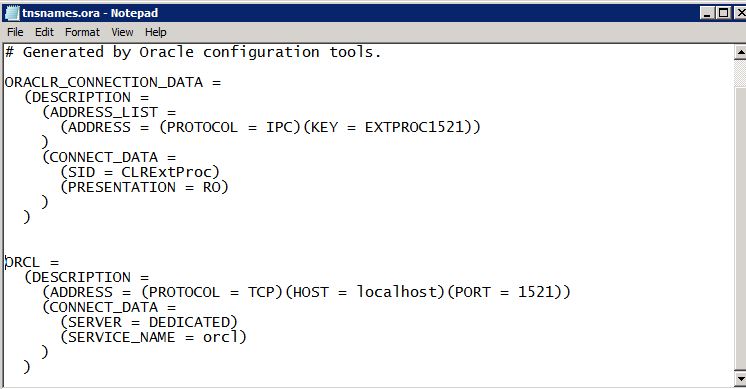
To solve this you need to add entry in listener.ora  file.

in my case I have did the following steps. It might help you to resolve the issue in you case.. please check the following steps which I was followed.

when I try to start the database I got this error.


I was added entry in Listener.ora as well tnsnames.ora fiels.


This was before adding the exact name in tnsnames.ora file

After adding exact listener name in the file 


And then I was try to do tnsping to the listener which was added. If the tnsping was success then it was communicating.. 


Now you can see the database is up with the proper listener which was added.


How to Check Oracle Database Tablespace for individual tablespace.

Check Individual tablespace allocated Quota, Free and used  details.


You can run the below query with DBA privileges.

Below query will give you the result in GB's


SELECT df.tablespace_name "Tablespace",
  totalusedspace "Used GB",
  (df.totalspace - tu.totalusedspace) "Free GB",
  df.totalspace "Total GB",
  ROUND(100 * ( (df.totalspace - tu.totalusedspace)/ df.totalspace)) "% Free"
FROM
  (SELECT tablespace_name,
    ROUND(SUM(bytes) / (1024*1024*1024)) TotalSpace
  FROM dba_data_files
  GROUP BY tablespace_name
  ) df,
  (SELECT ROUND(SUM(bytes)/(1024*1024*1024)) totalusedspace,
    tablespace_name
  FROM dba_segments
  GROUP BY tablespace_name
  ) tu
WHERE df.tablespace_name = tu.tablespace_name
and df.tablespace_name='USERS'


You will get the Tablespace size in MB's by running the following :

SELECT df.tablespace_name "Tablespace",
  totalusedspace "Used GB",
  (df.totalspace - tu.totalusedspace) "Free GB",
  df.totalspace "Total GB",
  ROUND(100 * ( (df.totalspace - tu.totalusedspace)/ df.totalspace)) "% Free"
FROM
  (SELECT tablespace_name,
    ROUND(SUM(bytes) / (1024*1024)) TotalSpace
  FROM dba_data_files
  GROUP BY tablespace_name
  ) df,
  (SELECT ROUND(SUM(bytes)/(1024*1024)) totalusedspace,
    tablespace_name
  FROM dba_segments
  GROUP BY tablespace_name
  ) tu
WHERE df.tablespace_name = tu.tablespace_name
and df.tablespace_name='USERS'

Thursday, October 4, 2018

Original date created for an Oracle table

Created date from the Oracle table :

To know the original created date of a particular table there is a view called "dba_objects".

here is the view description

SYSTEM@orcl:SQL>desc dba_objects
 Name                                      Null?    Type
 ----------------------------------------- -------- ----------------------------
 OWNER                                              VARCHAR2(30)
 OBJECT_NAME                                        VARCHAR2(128)
 SUBOBJECT_NAME                                     VARCHAR2(30)
 OBJECT_ID                                          NUMBER
 DATA_OBJECT_ID                                     NUMBER
 OBJECT_TYPE                                        VARCHAR2(19)
 CREATED                                            DATE
 LAST_DDL_TIME                                      DATE
 TIMESTAMP                                          VARCHAR2(19)
 STATUS                                             VARCHAR2(7)
 TEMPORARY                                          VARCHAR2(1)
 GENERATED                                          VARCHAR2(1)
 SECONDARY                                          VARCHAR2(1)
 NAMESPACE                                          NUMBER
 EDITION_NAME                                       VARCHAR2(30)

In this view there  is a column named "created " exists in the data dictionary dba_objects view.

using this created we can get the details when was table created.

you can use the following query to get the date.

SELECT CREATED FROM DBA_OBJECTS
WHERE  OBJECT_TYPE = 'TABLE'
AND OBJECT_NAME = 'USERDETAILS';

sample out put will be :

CREATED
---------
13-FEB-18

Thursday, April 12, 2018

Latest 10 rows from oracle.


we can get the recent or latest 10 rows from oracle database based on the sysdate i.e current date.

below query will give you the today's recent 10 transactions.

SELECT *
   FROM (SELECT ID,CREATED FROM EMP
            WHERE TRUNC(CREATED)>=TRUNC(SYSDATE) ORDER BY CREATED DESC )
WHERE ROWNUM <= 10

Monday, November 6, 2017

ORA-01589: must use RESETLOGS or NORESETLOGS option for database open


Error::

SQL> startup
ORACLE instance started.

Total System Global Area  778387456 bytes
Fixed Size                  1374808 bytes
Variable Size             494929320 bytes
Database Buffers          276824064 bytes
Redo Buffers                5259264 bytes
Database mounted.
ORA-01589: must use RESETLOGS or NORESETLOGS option for database open

Cause: Either incomplete or backup control file recovery has been performed. when you see these types of recovery you must specify either the RESETLOGS option or the NORESETLOGS option in-order to open your database.


Solution ::

* When you run the startup command you will get the following error.

SQL> startup
ORACLE instance started.

Total System Global Area  778387456 bytes
Fixed Size                  1374808 bytes
Variable Size             494929320 bytes
Database Buffers          276824064 bytes
Redo Buffers                5259264 bytes
Database mounted.
ORA-01589: must use RESETLOGS or NORESETLOGS option for database open

SQL> alter database open noresetlogs;
alter database open noresetlogs
*
ERROR at line 1:
ORA-01588: must use RESETLOGS option for database open

* Use the following command to recovery the database.

C:\Users\She>rman target /

Recovery Manager: Release 11.2.0.1.0 - Production on Thu Sep 14 20:04:01 2017

Copyright (c) 1982, 2009, Oracle and/or its affiliates.  All rights reserved.

connected to target database: ORCL (DBID=1398505858, not open)

RMAN>   recover database;

Starting recover at 14-SEP-17
using target database control file instead of recovery catalog
allocated channel: ORA_DISK_1
channel ORA_DISK_1: SID=156 device type=DISK

starting media recovery

archived log for thread 1 with sequence 357 is already on disk as file D:\APP\SH
ESHA\ORADATA\ORCL\REDO03.LOG
archived log for thread 1 with sequence 358 is already on disk as file D:\APP\SH
ESHA\ORADATA\ORCL\REDO01.LOG
archived log file name=D:\APP\She\ORADATA\ORCL\REDO03.LOG thread=1 sequence=3
57
media recovery complete, elapsed time: 00:00:14
Finished recover at 14-SEP-17

RMAN> exit


Recovery Manager complete.

* Once the recovery manager complete then do the following process.

C:\Users\She>sqlplus / as sysdba

SQL*Plus: Release 11.2.0.1.0 Production on Thu Sep 14 20:05:03 2017

Copyright (c) 1982, 2010, Oracle.  All rights reserved.


Connected to:
Oracle Database 11g Enterprise Edition Release 11.2.0.1.0 - Production
With the Partitioning, OLAP, Data Mining and Real Application Testing options

SQL> shut immediate
ORA-01109: database not open


Database dismounted.
ORACLE instance shut down.
SQL> startup mount
ORACLE instance started.

Total System Global Area  778387456 bytes
Fixed Size                  1374808 bytes
Variable Size             494929320 bytes
Database Buffers          276824064 bytes
Redo Buffers                5259264 bytes
Database mounted.

SQL> ALTER DATABASE OPEN RESETLOGS;

Database altered.

SQL> exit
Disconnected from Oracle Database 11g Enterprise Edition Release 11.2.0.1.0 - Pr
oduction
With the Partitioning, OLAP, Data Mining and Real Application Testing options

C:\Users\She>sqlplus hr/hr

SQL*Plus: Release 11.2.0.1.0 Production on Thu Sep 14 20:07:02 2017

Copyright (c) 1982, 2010, Oracle.  All rights reserved.


Connected to:
Oracle Database 11g Enterprise Edition Release 11.2.0.1.0 - Production
With the Partitioning, OLAP, Data Mining and Real Application Testing options

SQL>


** In the above we have used the below commands after successfully recovery.

shut immediate;
startup mount:
alter databse open resetlogs;