Monday, September 23, 2019

ORA-00119 :ORA-00132 invalid specification for system parameter LOCAL_LISTENER

ORA-00119 : invalid specification for system parameter LOCAL_LISTENER


When I try to start the database getting the following error :

SQL> STARTUP
ORA-00119: invalid specification for system parameter LOCAL_LISTENER
ORA-00132: syntax error or unresolved network name ‘LISTENER_LOCAL’

Solution :

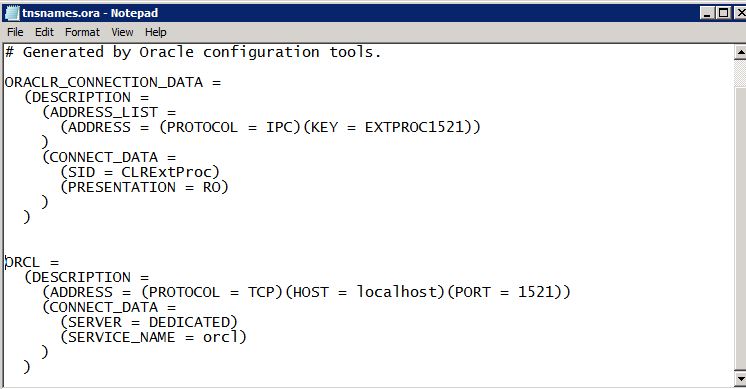
Open tnsnames.ora file and check for "LISTENER_LOCAL" listener description.

Usually you will find the tns entry like as follow :


ORCL =
  (DESCRIPTION =
    (ADDRESS_LIST =
      (ADDRESS = (PROTOCOL = TCP)(HOST = localhost)(PORT = 1521))
    )
    (CONNECT_DATA =
      (SERVICE_NAME = test)
    )
  )


In the TNS list if you didn't find the alias name like 'LISTENER_LOCAL'

Please add one more entry with the string with database you try to point:


LISTENER_LOCAL =
  (DESCRIPTION =
    (ADDRESS_LIST =
      (ADDRESS = (PROTOCOL = TCP)(HOST =)(PORT = 1521))
    )
    (CONNECT_DATA =
      (SERVICE_NAME = )
    )
  )


Save the file and try to start the database.

SQL>STARTUP
ORACLE instance started.


Total System Global Area 1912602624 bytes
Fixed Size                  2005192 bytes
Variable Size             369100600 bytes
Database Buffers         1526726656 bytes
Redo Buffers               14770176 bytes
Database mounted.
Database opened.

Tuesday, June 11, 2019

Change noarchivelog mode to archivelog mode in RAC


To check database is in archive log mode or not :

Run the command archive log list;

[oracle@node4 ~]$ sqlplus / as sysdba

SQL*Plus: Release 11.2.0.4.0 Production on Mon Jun 10 12:29:02 2019

Copyright (c) 1982, 2013, Oracle.  All rights reserved.


Connected to:
Oracle Database 11g Enterprise Edition Release 11.2.0.4.0 - 64bit Production
With the Partitioning, Real Application Clusters, Automatic Storage Management, OLAP,
Data Mining and Real Application Testing options

SQL>
SQL> archive log list
Database log mode        No Archive Mode
Automatic archival        Disabled
Archive destination        /u01/app/oracle/product/11.2.0.3/dbhome_1/dbs/arch
Oldest online log sequence     2
Current log sequence        3
SQL>
SQL> exit
Disconnected from Oracle Database 11g Enterprise Edition Release 11.2.0.4.0 - 64bit Production
With the Partitioning, Real Application Clusters, Automatic Storage Management, OLAP,
Data Mining and Real Application Testing options

Based on above result database is in  "no archive mode".
This means database is not in archive log mode.

To enable the database in archive log mode in RAC  run the below commands.

1. Stop the database using SRVCTL.
2. Start database in mount state.
3. Run the command to enable the archive mode "alter database archivelog;"
4. Stop the database using SRVCTL.
5. Start database using SRVCTL.
6. Set the archive destination to ASM DISK by running the command
alter system set log_archive_dest_1='LOCATION=+FRADG/' scope=both sid='*';

After that connect to Sql and run  archive log list


Stop the database using SRVCTL :

[oracle@node4 ~]$ srvctl stop database -d racdb
[oracle@node4 ~]$

Start databse in mount state :

[oracle@node4 ~]$ srvctl start database -d racdb -o mount
[oracle@node4 ~]$
[oracle@node4 ~]$ sqlplus / as sysdba

SQL*Plus: Release 11.2.0.4.0 Production on Mon Jun 10 12:29:02 2019

Copyright (c) 1982, 2013, Oracle.  All rights reserved.


Connected to:
Oracle Database 11g Enterprise Edition Release 11.2.0.4.0 - 64bit Production
With the Partitioning, Real Application Clusters, Automatic Storage Management, OLAP,
Data Mining and Real Application Testing options

SQL> select instance_name,status,archiver from gv$instance;

INSTANCE_NAME STATUS       ARCHIVE
---------------- ------------ -------
racdb1 MOUNTED      STOPPED
racdb2 MOUNTED      STOPPED

SQL>

Run the command to enable the archive mode :

SQL> alter database archivelog;

Database altered.

SQL> exit
Disconnected from Oracle Database 11g Enterprise Edition Release 11.2.0.4.0 - 64bit Production
With the Partitioning, Real Application Clusters, Automatic Storage Management, OLAP,
Data Mining and Real Application Testing options
[oracle@node4 ~]$

Stop the database using SRVCTL :

[oracle@node4 ~]$ srvctl stop database -d racdb
[oracle@node4 ~]$

Start the database using SRVCTL

[oracle@node4 ~]$ srvctl start database -d racdb
[oracle@node4 ~]$

Set the archive destination to ASM DISK by running the command  :

[oracle@node4 ~]$ sqlplus / as sysdba

SQL*Plus: Release 11.2.0.4.0 Production on Mon Jun 10 12:32:40 2019

Copyright (c) 1982, 2013, Oracle.  All rights reserved.


Connected to:
Oracle Database 11g Enterprise Edition Release 11.2.0.4.0 - 64bit Production
With the Partitioning, Real Application Clusters, Automatic Storage Management, OLAP,
Data Mining and Real Application Testing options

SQL> alter system set log_archive_dest_1='LOCATION=+FRADG/' scope=both sid='*';

System altered.

SQL> select instance_name,status,archiver from gv$instance;

INSTANCE_NAME STATUS       ARCHIVE
---------------- ------------ -------
racdb1 OPEN       STARTED
racdb2 OPEN       STARTED

SQL>

Check archive log mode now :
SQL> archive log list
Database log mode        Archive Mode
Automatic archival        Enabled
Archive destination        +FRADG
Oldest online log sequence     2
Next log sequence to archive   3
Current log sequence        3
SQL>

To check log switch run the command

SQL> alter system switch logfile;

System altered.

SQL> /

System altered.

SQL> archive log list
Database log mode        Archive Mode
Automatic archival        Enabled
Archive destination        +FRADG
Oldest online log sequence     4
Next log sequence to archive   5
Current log sequence        5
SQL> 

ADD DISKS TO ASM DISKGROUP

How do I add a disks to ASM DISKGROUP ?

1. Create partition of disk /dev/sde which we got new LUN from Storage.

you can check the disks as fdisk -l

for formatting the disks :::

[root@node4 Ora-Soft]# fdisk /dev/sdc
Device contains neither a valid DOS partition table, nor Sun, SGI or OSF disklabel
Building a new DOS disklabel with disk identifier 0x494214d4.
Changes will remain in memory only, until you decide to write them.
After that, of course, the previous content won't be recoverable.

Warning: invalid flag 0x0000 of partition table 4 will be corrected by w(rite)

WARNING: DOS-compatible mode is deprecated. It's strongly recommended to
         switch off the mode (command 'c') and change display units to
         sectors (command 'u').

Command (m for help): n
Command action
   e   extended
   p   primary partition (1-4)
p
Partition number (1-4): 1
First cylinder (1-261, default 1):  >> enter
Using default value 1
Last cylinder, +cylinders or +size{K,M,G} (1-261, default 261):  >> enter
Using default value 261

Command (m for help): w
The partition table has been altered!

Calling ioctl() to re-read partition table.
Syncing disks.

2.  Create ASM disk using oracleasm utility

[root@node4 Ora-Soft]# /etc/init.d/oracleasm createdisk ASMDISK2 /dev/sdc1
Marking disk "ASMDISK2" as an ASM disk:                    [  OK  ]

3  check Scadisks and Listdisks using oracleasm utility 

[root@node4 ~]# /etc/init.d/oracleasm scandisks
Scanning the system for Oracle ASMLib disks:               [  OK  ]
[root@node4 ~]# /etc/init.d/oracleasm listdisks
ASMDISK1
ASMDISK2
ASMDISK3
[root@node4 ~]#


4. Now Add the newly created oracle ASM disk to existing ASM diskgroup with the help of following query:

Login to grid user and loin as sysasm and run the following Query.

[grid@node4 ~]$ sqlplus / as sysasm

SQL*Plus: Release 11.2.0.4.0 Production on Mon Jun 10 17:12:36 2019

Copyright (c) 1982, 2013, Oracle.  All rights reserved.


Connected to:
Oracle Database 11g Enterprise Edition Release 11.2.0.4.0 - 64bit Production
With the Real Application Clusters and Automatic Storage Management options

SQL> select * from v$asm_operation;

no rows selected

SQL> ALTER DISKGROUP DATADG ADD DISK 'ORCL:ASMDISK2' REBALANCE POWER 11;

Diskgroup altered.

SQL> set lines 300
SQL> select * from v$asm_operation;

GROUP_NUMBER OPERA STAT      POWER     ACTUAL    SOFAR   EST_WORK   EST_RATE EST_MINUTES ERROR_CODE
------------ ----- ---- ---------- ---------- ---------- ---------- ---------- ----------- ------------
   1 REBAL RUN 11    11      288       1012   1366 0

Check Diskgroup size: 

SQL> SELECT NAME,TOTAL_MB/1024 as TOTAL_GB,FREE_MB /1024 as FREE_GB,(TOTAL_MB-FREE_MB)/1024 as USED_GB FROM v$asm_diskgroup; 

NAME TOTAL_GB    FREE_GB USED_GB
------------------------------ ---------- ---------- ----------
DATADG        3.99804688 2.01464844 1.98339844
FRADG        1.99902344 1.81347656 .185546875
VOTEDISK        1.99902344 1.61230469  .38671875

ORA-15032: not all alterations performed ORA-15260: permission denied on ASM disk group

When you add disks to ASM if you will get the following error :

SQL> ALTER DISKGROUP DATADG ADD DISK 'ORCL:DATADG2' REBALANCE POWER 11;
ALTER DISKGROUP DATADG ADD DISK 'ORCL:DATADG2' REBALANCE POWER 11
*
ERROR at line 1:
ORA-15032: not all alterations performed
ORA-15260: permission denied on ASM disk group

Solution : 
Connect as sysasm and try to run the commands.

[grid@node4 ~]$ sqlplus / as sysasm

SQL*Plus: Release 11.2.0.4.0 Production on Mon Jun 10 17:12:36 2019

Copyright (c) 1982, 2013, Oracle.  All rights reserved.


Connected to:
Oracle Database 11g Enterprise Edition Release 11.2.0.4.0 - 64bit Production
With the Real Application Clusters and Automatic Storage Management options

SQL> select * from v$asm_operation;                                    

no rows selected

SQL> ALTER DISKGROUP DATADG ADD DISK 'ORCL:DATADG2' REBALANCE POWER 11;

Diskgroup altered.

Monday, January 14, 2019

Check maximum number of processes & processes used by schema

To check maximum number of processes & processes used  by schema :

select resource_name, current_utilization, max_utilization from v$resource_limit where resource_name in ('processes','sessions');

-- processes/sessions are getting is by running max utilization is the high level ::

SELECT inst_id,resource_name, current_utilization, max_utilization, limit_value FROM gv$resource_limit
WHERE resource_name in ('processes','sessions');


--See which machines/schemas are causing any process exhaustion ::

--number of processes using by schema or machine


select distinct
        s.inst_id,
        s.username,
        s.machine,
        count(*)
from    gv$session s,
        gv$process p
where   s.paddr       =  p.addr
and     s.inst_id     =  p.inst_id
GROUP BY         s.inst_id,
        s.username,
        s.machine
ORDER BY 4 desc;

Thursday, December 27, 2018

ORA-00205: error in identifying control file, check alert log for more info

ORA-00205: error in identifying control file, check alert log for more info.


When startup the databse getting error like ORA-00205

[oracle@db_ ~]$ sqlplus / as sysdba

SQL*Plus: Release 11.2.0.1.0 Production on Thu Dec 27 21:18:15 2018

Copyright (c) 1982, 2009, Oracle.  All rights reserved.

Connected to an idle instance.

SYS@adjstage>startup
ORACLE instance started.

Total System Global Area 1068937216 bytes
Fixed Size     2220200 bytes
Variable Size   855641944 bytes
Database Buffers   201326592 bytes
Redo Buffers     9748480 bytes
ORA-00205: error in identifying control file, check alert log for more info

Solution :- 

Check the control file location.

SYS@adjstage>show parameter control_files

NAME      TYPE VALUE
------------------------------------ ----------- ------------------------------
control_files      string /u01/datafile/adjstage_datafil
es/ADJSTAGE/controlfile/o1_mf_
7knp4dys_.ctl

Ensure control file exists in the respective locations.

Also check the permission for the file.

[root@db_ controlfile]# ll u01/datafile/adjstage_datafiles/ADJSTAGE/controlfile/o1_mf_7knp4dys_.ctl

-rw-r----- 1 oracle oinstall 14237696 Dec 27 22:38 o1_mf_7knp4dys_.ctl
[root@db_ controlfile]# 

permission should be oracle:oinstall.
After checking the permission shutdown and startup the database.

Shutdown the database and start it up:

SYS@adjstage> shut immediate;
ORA-01507: database not mounted
ORACLE instance shut down.

SYS@adjstage>startup
ORACLE instance started.

Total System Global Area 1068937216 bytes
Fixed Size     2220200 bytes
Variable Size   855641944 bytes
Database Buffers   201326592 bytes
Redo Buffers     9748480 bytes
Database mounted.
Database opened.


SYS@adjstage>select name,open_mode from v$database;  

NAME   OPEN_MODE
--------- --------------------
ADJSTAGE  READ WRITE


Monday, October 15, 2018

ORA-00119: invalid specification for system parameter LOCAL_LISTENER /ORA-00132: syntax error or unresolved network name 'LISTENER_'

ORA-00119: invalid specification for system parameter LOCAL_LISTENER  /ORA-00132: syntax error or unresolved network name 'LISTENER_':


Some time when you try to startup the database you will get the following errors.

ORA-00119: invalid specification for system parameter LOCAL_LISTENER
ORA-00132: syntax error or unresolved network name 'LISTENER_ORCL'

It is just because of Listener not running or missing listener which was shown in the error.

To solve this you need to add entry in listener.ora  file.

in my case I have did the following steps. It might help you to resolve the issue in you case.. please check the following steps which I was followed.

when I try to start the database I got this error.


I was added entry in Listener.ora as well tnsnames.ora fiels.


This was before adding the exact name in tnsnames.ora file

After adding exact listener name in the file 


And then I was try to do tnsping to the listener which was added. If the tnsping was success then it was communicating.. 


Now you can see the database is up with the proper listener which was added.


How to Check Oracle Database Tablespace for individual tablespace.

Check Individual tablespace allocated Quota, Free and used  details.


You can run the below query with DBA privileges.

Below query will give you the result in GB's


SELECT df.tablespace_name "Tablespace",
  totalusedspace "Used GB",
  (df.totalspace - tu.totalusedspace) "Free GB",
  df.totalspace "Total GB",
  ROUND(100 * ( (df.totalspace - tu.totalusedspace)/ df.totalspace)) "% Free"
FROM
  (SELECT tablespace_name,
    ROUND(SUM(bytes) / (1024*1024*1024)) TotalSpace
  FROM dba_data_files
  GROUP BY tablespace_name
  ) df,
  (SELECT ROUND(SUM(bytes)/(1024*1024*1024)) totalusedspace,
    tablespace_name
  FROM dba_segments
  GROUP BY tablespace_name
  ) tu
WHERE df.tablespace_name = tu.tablespace_name
and df.tablespace_name='USERS'


You will get the Tablespace size in MB's by running the following :

SELECT df.tablespace_name "Tablespace",
  totalusedspace "Used GB",
  (df.totalspace - tu.totalusedspace) "Free GB",
  df.totalspace "Total GB",
  ROUND(100 * ( (df.totalspace - tu.totalusedspace)/ df.totalspace)) "% Free"
FROM
  (SELECT tablespace_name,
    ROUND(SUM(bytes) / (1024*1024)) TotalSpace
  FROM dba_data_files
  GROUP BY tablespace_name
  ) df,
  (SELECT ROUND(SUM(bytes)/(1024*1024)) totalusedspace,
    tablespace_name
  FROM dba_segments
  GROUP BY tablespace_name
  ) tu
WHERE df.tablespace_name = tu.tablespace_name
and df.tablespace_name='USERS'

Thursday, October 4, 2018

Original date created for an Oracle table

Created date from the Oracle table :

To know the original created date of a particular table there is a view called "dba_objects".

here is the view description

SYSTEM@orcl:SQL>desc dba_objects
 Name                                      Null?    Type
 ----------------------------------------- -------- ----------------------------
 OWNER                                              VARCHAR2(30)
 OBJECT_NAME                                        VARCHAR2(128)
 SUBOBJECT_NAME                                     VARCHAR2(30)
 OBJECT_ID                                          NUMBER
 DATA_OBJECT_ID                                     NUMBER
 OBJECT_TYPE                                        VARCHAR2(19)
 CREATED                                            DATE
 LAST_DDL_TIME                                      DATE
 TIMESTAMP                                          VARCHAR2(19)
 STATUS                                             VARCHAR2(7)
 TEMPORARY                                          VARCHAR2(1)
 GENERATED                                          VARCHAR2(1)
 SECONDARY                                          VARCHAR2(1)
 NAMESPACE                                          NUMBER
 EDITION_NAME                                       VARCHAR2(30)

In this view there  is a column named "created " exists in the data dictionary dba_objects view.

using this created we can get the details when was table created.

you can use the following query to get the date.

SELECT CREATED FROM DBA_OBJECTS
WHERE  OBJECT_TYPE = 'TABLE'
AND OBJECT_NAME = 'USERDETAILS';

sample out put will be :

CREATED
---------
13-FEB-18