Friday, November 11, 2016

Oracle Database Standard Edition and Enterprise Edition License, Named User Plus and Perpetual

Product Description

Oracle Standard Edition 2 (SE2) database software is a full-featured database that includes all features needed to build business applications. SE2 has a low-entry price and offers low maintenance costs as well as improved performance, reliability, and security.

Oracle Database Standard Edition Two (SE2) can only be licensed on servers that have a maximum capacity of 2 sockets. If licensing by Named User Plus, the minimum is 10 Named User Plus licenses.When used with Oracle Real Application Clusters, may only be licensed on a single cluster of servers supporting up to a total maximum capacity of 2 sockets.
Oracle Database 12c Standard Edition 2 delivers unprecedented ease-of-use, power, and price/performance for database applications on servers that have a maximum capacity of two sockets.

Oracle Database Standard Edition 2 is an affordable, full featured database that delivers unprecedented ease of use, power, and performance for work group, department-level, and web applications.
From single-server environments for small business to highly distributed branch environments, Oracle Database Standard Edition 2 includes all the facilities necessary to build business-critical applications with support for clustering of services with Oracle Real Application Clusters (Oracle RAC). It also enables users to leverage a Multitenant architecture to provide more flexible and responsive management for their databases moving forward, provides enterprise-class performance and security, is simple to manage, and can easily scale as demand increases. Oracle Database Standard Edition 2 manages all data types and enables all your business applications to take advantage of the performance, reliability, security and scalability for which Oracle is renowned. It also provides complete upward compatibility with Oracle Database Enterprise Edition, protecting your investment as your requirements grow.

Features :

  •  Fast Installation, Configuration and Self Management.
  • Suitable for all types of data, and applications.
  • Fully upgrade-able to Oracle Database Enterprise Edition.
  • Offers customers a container database architecture, making it easier to plug into the cloud
  • SE2 replaced Oracle Databases Standard Edition (SE) and Standard Edition 1 (SE1) to make an enterprise-class database available to SMB customers.
  •  Optimized for deployment in  small enterprises, line-of-business departments, and distributed branch environments
  •  Built-in Real Application Clusters and Automatic Storage Management.
  •  High availability and rapid application development tools supporting a wide range of developer frameworks.
  •  Cost effective license model – licensed per Socket vs. Cores regardless of how many cores are added over time.
  •  Enables easy migration to the cloud.
  •  Protects your investments as usage requirements grow by offering upward compatibility.
  •  Zero-cost license migration from either SE or SE1 to SE2.
Benefits :
  •     Low cost entry price
  •     Low maintenance costs
  •     Reduced cost of downtime
  •     Proven performance, reliability and security
  •     Save money by buying only what you need today, and scale out as your demand changes with Real Application Clusters
  •     Improve Quality of Service with enterprise-class performance, security and availability
  •     Run on Windows, Linux, and Unix operating systems and easily manage with automated, self-managing capabilities
  •     Streamline application development with Oracle Application Express, Oracle SQL Developer and Oracle Data Access Components for Windows
Technical Specifications :
  •     Maximum Sockets – 2
  •     Maximum Threads Per Database – 16
  •     The maximum core counts per 2-socket server can increase over time without impacting customer  license obligation
  •     Minimum NUPS Per Server – 10
  •     When used with Oracle Real Application Clusters (RAC), each Oracle Database Standard Edition 2 database may use a maximum of 8 CPU threads per instance at any time.
  •     RAC clusters are limited to 2 nodes, each node must be a single-socket server.
  •     RAM – OS Max
  •     Database Size – no limit
  •     Windows, Linux, Unix, 64-Bit Support
  •     SE2 is required when upgrading to database version 12.1.0.

Minimum Quantities :
The minimum license requirements for database products are in listed below.
Named User Plus licenses:

Program                                                                     Named User Plus Minimum
Oracle Database Enterprise Edition                              25 Named Users Plus per Processor
Oracle Database Standard Edition                                10 Named Users Plus*

Oracle Database Enterprise Edition Options and Enterprise Managers Enterprise Edition Options & Enterprise Managers must match the number of licenses of the associated Oracle Database Enterprise Edition. In addition, a minimum of 25 Named User Plus licenses per Processor must be met. Associated Database is defined as the database(s) which is (are) being managed by the option.

Oracle Standard Edition One    5 Named Users Plus**

** Oracle Standard Edition One may only be licensed on servers that have a maximum capacity of 2 sockets. If licensing by Named User Plus, the minimum is 10 Named User Plus licenses.
 
 If the user minimum is 25 Named Users Plus per processor, then follow the instructions below to calculate the minimum number of named user plus licenses required for your intended hardware configuration.

1. Determine the number of processors on each server where the programs are installed and/or running.
2. Add together the processors on each server.
3. Multiply the total number of processors by 25.
4. The resultant number represents the minimum number of named user plus licenses required for this hardware configuration.

Example: For Database Enterprise Edition on 3 servers each with 2 processors:

1. Number of processors on each server = 2
2. Total number of processors = 6 (3 servers x 2 processors = 6)
3. Multiply the total number of processors by 25 - the required minimum for Database Enterprise Edition is 25 named users plus per processor. (6*25 = 150 named users plus)
4. For this hardware configuration containing 6 processors the minimum number of named user plus licenses required for Database Enterprise Edition is 150.

Processor licenses:

The minimum is 1 for all Oracle Database Products.
Database licensing and user minimums

Example:
A customer who wants to license the Database Enterprise Edition on a 4-way  box  will  be  required  to  license  a  minimum  of  4  processors  *  25  Named User Plus, which is equal to 100 Named User Plus.

Processor:
This metric is used in environments where users cannot be identified and counted.  The Internet is a typical environment where it is often difficult to count   users.      This   metric   can   also   be   used   when   the   Named   User   Plus population  is  very  high  and  it  is  more  cost  effective  for  the  customer  to  license the Database using the Processor metric. The Processor metric is not offered for Personal Edition.    The  number  of  required  licenses  shall  be  determined  by multiplying  the  total  number  of  cores  of  the  processor  by  a  core  processor licensing  factor  specified  on  the  Oracle  Processor  Core  Factor  Table  which  can be  accessed  at  http://oracle.com/contracts.  All  cores  on  all  multicore  chips  for each   licensed   program   are   to   be   aggregated   before   multiplying   by   the appropriate  core  processor  licensing  factor  and  all  fractions  of  a  number  are  to be  rounded  up to  the  next  whole  number.    When licensing Oracle programs
with  Standard  Edition  One,  Standard  Edition  2 or  Standard  Edition  in  the product  name,  a  processor  is  counted  equivalent  to  a  socket;  however,  in  the case  of  multi-chip  modules,  each  chip  in  the  multi-chip  module  is  counted  as one occupied socket.

For example, a multicore chip based server with an Oracle Processor Core Factor of 0.25 installed and/or running the program (other than Standard Edition One programs  or  Standard  Edition  programs)  on  6  cores  would  require  2  processor licenses  (6  multiplied  by  a  core  processor  licensing  factor  of  .25  equals  1.50,which  is  then  rounded  up  to  the  next  whole  number,  which  is  2).    As  another example, a multicore server for a hardware platform not specified in the Oracle Processor  Core  Factor  Table  installed  and/or  running  the  program  on  10  cores
would require 10 processor licenses (10 multiplied by a core processor licensing factor of 1.0 for ‘All other multicore chips’ equals 10).

Note on Minimums:
Product Minimums for Named User Plus licenses (where the minimums are per processor) are calculated after the number of processors to be licensed is determined, using the processor definition.

Wednesday, October 19, 2016

CREATE DATABASE LINK


Private database link - belongs to a specific schema of a database. Only the owner of a private database link can use it.
Public database link - all users in the database can use it.
Global database link - defined in an OID or Oracle Names Server. Anyone on the network can use it.

Use CREATE DATABASE LINK statement to create a database link. A database link is a schema object in one database that enables you to access objects on another database.

Once you have created a database link, you can use it to view the tables on the other database using SQL statements, on the other database by appending @dblink to the table. You can also access remote tables using any INSERT, UPDATE, DELETE statements.

Create database link :
create public database link
 
connect to
 
identified by
 
using <'tns_service_name'>;

ex 1 : create database link msql connect to user_sqlserver identified by password using 'MSQL';

ex 2 : create public database link link_db connect to murthy identified by murthy123 using 'local';

ex 3 : create public database link
             demo_db                                         ---- db link name.
              connect to
                  murty identified by murthy123  -- remote db username/password
                  using '192.168.6.201:1521/orcl'; -- remote database ip with port number.


you can check the other schema tables by using the following command

sql> select * from murthy_demo@demo_db

Sunday, October 2, 2016

Failed to create Oracle Cluster Registry configuration, rc 255

In Oracle Rac Grid installation when you run the root.sh file, if you get the following errors :
ORA-27091: unable to queue I/O, ORA-15081 failed to submit an I/O operation to a disk.

[root@ocluster01 ~]# /u01/app/11.2.0/grid/root.sh
Performing root user operation for Oracle 11g

The following environment variables are set as:
    ORACLE_OWNER= grid
    ORACLE_HOME=  /u01/app/11.2.0/grid

Enter the full pathname of the local bin directory: [/usr/local/bin]:
The contents of "dbhome" have not changed. No need to overwrite.
The contents of "oraenv" have not changed. No need to overwrite.
The contents of "coraenv" have not changed. No need to overwrite.

Entries will be added to the /etc/oratab file as needed by
Database Configuration Assistant when a database is created
Finished running generic part of root script.
Now product-specific root actions will be performed.
Using configuration parameter file: /u01/app/11.2.0/grid/crs/install/crsconfig_params
User ignored Prerequisites during installation
Installing Trace File Analyzer
OLR initialization - successful
Adding Clusterware entries to upstart
CRS-2672: Attempting to start 'ora.mdnsd' on 'ocluster01'
CRS-2676: Start of 'ora.mdnsd' on 'ocluster01' succeeded
CRS-2672: Attempting to start 'ora.gpnpd' on 'ocluster01'
CRS-2676: Start of 'ora.gpnpd' on 'ocluster01' succeeded
CRS-2672: Attempting to start 'ora.cssdmonitor' on 'ocluster01'
CRS-2672: Attempting to start 'ora.gipcd' on 'ocluster01'
CRS-2676: Start of 'ora.cssdmonitor' on 'ocluster01' succeeded
CRS-2676: Start of 'ora.gipcd' on 'ocluster01' succeeded
CRS-2672: Attempting to start 'ora.cssd' on 'ocluster01'
CRS-2672: Attempting to start 'ora.diskmon' on 'ocluster01'
CRS-2676: Start of 'ora.diskmon' on 'ocluster01' succeeded
CRS-2676: Start of 'ora.cssd' on 'ocluster01' succeeded

ASM created and started successfully.

Disk Group DATA created successfully.

Errors in file :
ORA-27091: unable to queue I/O
ORA-15081: failed to submit an I/O operation to a disk
ORA-06512: at line 4
Errors in file :
ORA-27091: unable to queue I/O
ORA-15081: failed to submit an I/O operation to a disk
ORA-06512: at line 4
Failed to create Oracle Cluster Registry configuration, rc 255
Oracle Grid Infrastructure Repository configuration failed at /u01/app/11.2.0/grid/crs/install/crsconfig_lib.pm line 6919.
/u01/app/11.2.0/grid/perl/bin/perl -I/u01/app/11.2.0/grid/perl/lib -I/u01/app/11.2.0/grid/crs/install /u01/app/11.2.0/grid/crs/install/rootcrs.pl execution failed
[root@ocluster01 ~]#

there are 2 reasons that might you will get this error is :
1. there might me issue with the permissions of grid base and asm disks.
2.it might be issue with configuration of oracleasm.

first you need to deconfigure the root.sh by using following command.

1. As root, run "$GRID_HOME/crs/install/rootcrs.pl -verbose -deconfig -force" on all nodes, except the last one.
for last node you need to run below command
2. As root, run "$GRID_HOME/crs/install/rootcrs.pl -verbose -deconfig -force -lastnode"

[root@ocluster01 oracle]# /u01/app/11.2.0/grid/crs/install/rootcrs.pl -verbose -deconfig -force
Using configuration parameter file: /u01/app/11.2.0/grid/crs/install/crsconfig_params
PRCR-1119 : Failed to look up CRS resources of ora.cluster_vip_net1.type type
PRCR-1068 : Failed to query resources
Cannot communicate with crsd
PRCR-1070 : Failed to check if resource ora.gsd is registered
Cannot communicate with crsd
PRCR-1070 : Failed to check if resource ora.ons is registered
Cannot communicate with crsd

CRS-2791: Starting shutdown of Oracle High Availability Services-managed resources on 'ocluster01'
CRS-2673: Attempting to stop 'ora.ctssd' on 'ocluster01'
CRS-2673: Attempting to stop 'ora.asm' on 'ocluster01'
CRS-2673: Attempting to stop 'ora.mdnsd' on 'ocluster01'
CRS-2677: Stop of 'ora.mdnsd' on 'ocluster01' succeeded
CRS-2677: Stop of 'ora.asm' on 'ocluster01' succeeded
CRS-2673: Attempting to stop 'ora.cluster_interconnect.haip' on 'ocluster01'
CRS-2677: Stop of 'ora.cluster_interconnect.haip' on 'ocluster01' succeeded
CRS-2677: Stop of 'ora.ctssd' on 'ocluster01' succeeded
CRS-2673: Attempting to stop 'ora.cssd' on 'ocluster01'
CRS-2677: Stop of 'ora.cssd' on 'ocluster01' succeeded
CRS-2673: Attempting to stop 'ora.gipcd' on 'ocluster01'
CRS-2677: Stop of 'ora.gipcd' on 'ocluster01' succeeded
CRS-2673: Attempting to stop 'ora.gpnpd' on 'ocluster01'
CRS-2677: Stop of 'ora.gpnpd' on 'ocluster01' succeeded
CRS-2793: Shutdown of Oracle High Availability Services-managed resources on 'ocluster01' has completed
CRS-4133: Oracle High Availability Services has been stopped.
Removing Trace File Analyzer
error: package cvuqdisk is not installed
Successfully deconfigured Oracle clusterware stack on this node
[root@ocluster01 oracle]# /u01/app/11.2.0/grid/crs/install/rootcrs.pl -verbose -deconfig -force -lastnode
Using configuration parameter file: /u01/app/11.2.0/grid/crs/install/crsconfig_params
Adding Clusterware entries to upstart
crsexcl failed to start
Failed to start the Clusterware. Last 20 lines of the alert log follow:
[client(9216)]CRS-1006:The OCR location +DATA is inaccessible. Details in /u01/app/11.2.0/grid/log/ocluster01/client/ocrconfig_9216.log.
2016-10-02 12:49:30.114:
[client(9216)]CRS-1001:The OCR was formatted using version 3.
[client(12853)]CRS-10001:02-Oct-16 13:06 ACFS-9459: ADVM/ACFS is not supported on this OS version: 'centos-release-6-8.el6.centos.12.3.x86_64
'
[client(12855)]CRS-10001:02-Oct-16 13:06 ACFS-9201: Not Supported
2016-10-02 13:06:31.010:
[ctssd(9018)]CRS-2405:The Cluster Time Synchronization Service on host ocluster01 is shutdown by user
2016-10-02 13:06:31.017:
[mdnsd(8889)]CRS-5602:mDNS service stopping by request.
2016-10-02 13:06:43.359:
[cssd(8957)]CRS-1603:CSSD on node ocluster01 shutdown by user.
2016-10-02 13:06:43.855:
[ohasd(8496)]CRS-2767:Resource state recovery not attempted for 'ora.cssdmonitor' as its target state is OFFLINE
2016-10-02 13:06:43.856:
[ohasd(8496)]CRS-2769:Unable to failover resource 'ora.cssdmonitor'.
2016-10-02 13:06:44.771:
[ohasd(8496)]CRS-2769:Unable to failover resource 'ora.cssd'.
2016-10-02 13:06:48.722:
[gpnpd(8900)]CRS-2329:GPNPD on node ocluster01 shutdown.

****Unable to retrieve Oracle Clusterware home.
Start Oracle Clusterware stack and try again.
****Unable to retrieve Oracle Clusterware home.
Start Oracle Clusterware stack and try again.
****Unable to retrieve Oracle Clusterware home.
Start Oracle Clusterware stack and try again.
****Unable to retrieve Oracle Clusterware home.
Start Oracle Clusterware stack and try again.
****Unable to retrieve Oracle Clusterware home.
Start Oracle Clusterware stack and try again.
Either /etc/oracle/ocr.loc does not exist or is not readable
Make sure the file exists and it has read and execute access
Either /etc/oracle/ocr.loc does not exist or is not readable
Make sure the file exists and it has read and execute access
CRS-4047: No Oracle Clusterware components configured.
CRS-4000: Command Stop failed, or completed with errors.
Either /etc/oracle/ocr.loc does not exist or is not readable
Make sure the file exists and it has read and execute access
Either /etc/oracle/ocr.loc does not exist or is not readable
Make sure the file exists and it has read and execute access
################################################################
# You must kill processes or reboot the system to properly #
# cleanup the processes started by Oracle clusterware          #
################################################################
Either /etc/oracle/ocr.loc does not exist or is not readable
Make sure the file exists and it has read and execute access
Either /etc/oracle/ocr.loc does not exist or is not readable
Make sure the file exists and it has read and execute access
Either /etc/oracle/olr.loc does not exist or is not readable
Make sure the file exists and it has read and execute access
Either /etc/oracle/olr.loc does not exist or is not readable
Make sure the file exists and it has read and execute access
Failure in execution (rc=-1, 256, No such file or directory) for command /etc/init.d/ohasd deinstall
error: package cvuqdisk is not installed
Successfully deconfigured Oracle clusterware stack on this node
[root@ocluster01 oracle]# 


then remove the existing ASMdisks : 

[root@ocluster01 ~]# /etc/init.d/oracleasm deletedisk ASMDISK1
Removing ASM disk "ASMDISK1":                              [  OK  ]
[root@ocluster01 ~]# /etc/init.d/oracleasm deletedisk ASMDISK2
Removing ASM disk "ASMDISK2":                              [  OK  ]
[root@ocluster01 ~]# /etc/init.d/oracleasm deletedisk ASMDISK3
Removing ASM disk "ASMDISK3":   
[root@ocluster01 ~]#

then after you have to configure the oracleasm and create disks again as following :
[root@ocluster01 ~]# /etc/init.d/oracleasm configure -i
Configuring the Oracle ASM library driver.

This will configure the on-boot properties of the Oracle ASM library
driver.  The following questions will determine whether the driver is
loaded on boot and what permissions it will have.  The current values
will be shown in brackets ('[]').  Hitting without typing an
answer will keep that current value.  Ctrl-C will abort.

Default user to own the driver interface [grid]: grid
Default group to own the driver interface [dba]: asmadmin

Start Oracle ASM library driver on boot (y/n) [y]: y
Scan for Oracle ASM disks on boot (y/n) [y]: y
Writing Oracle ASM library driver configuration: done
Initializing the Oracle ASMLib driver:                     [  OK  ]
Scanning the system for Oracle ASMLib disks:               [  OK  ]
 

[root@ocluster01 ~]# /etc/init.d/oracleasm init
Usage: /etc/init.d/oracleasm {start|stop|restart|enable|disable|configure|createdisk|deletedisk|querydisk|listdisks|scandisks|status}
[root@ocluster01 ~]# /etc/init.d/oracleasm createdisk ASMDISK1 /dev/sdb1
Marking disk "ASMDISK1" as an ASM disk:                    [  OK  ]
[root@ocluster01 ~]# /etc/init.d/oracleasm createdisk ASMDISK2 /dev/sdc1
Marking disk "ASMDISK2" as an ASM disk:                    [  OK  ]
[root@ocluster01 ~]# /etc/init.d/oracleasm createdisk ASMDISK3 /dev/sdd1
Marking disk "ASMDISK3" as an ASM disk:                    [  OK  ]
[root@ocluster01 ~]# /etc/init.d/oracleasm scandisks
Scanning the system for Oracle ASMLib disks:               [  OK  ]
[root@ocluster01 ~]# /etc/init.d/oracleasm listdisks
ASMDISK1
ASMDISK2
ASMDISK3
[root@ocluster01 ~]#

After successfully created the ASM disks then you have to re run the root.sh .

[root@ocluster01 ~]# /u01/app/11.2.0/grid/root.sh

hope you will get success... All the best.!!!.

Another reason might be issue with permissions.

keep check the grid base & grid home.
Grid_base and Grid_home groups it should be grid:oinstall.

Disk Permissions.

[root@ocluster01 ~]# ls -l /dev/oracleasm/disks/
total 0
brw-rw---- 1 grid asmadmin 8, 17 Oct  2 12:45 ASMDISK1
brw-rw---- 1 grid asmadmin 8, 33 Oct  2 12:45 ASMDISK2
brw-rw---- 1 grid asmadmin 8, 49 Oct  2 12:45 ASMDISK3
[root@ocluster01 ~]# ll /dev/sd*
brw-rw---- 1 root disk 8,  0 Oct  2 01:30 /dev/sda
brw-rw---- 1 root disk 8,  1 Oct  1 15:25 /dev/sda1
brw-rw---- 1 root disk 8,  2 Oct  1 15:25 /dev/sda2
brw-rw---- 1 root disk 8, 16 Oct  2 12:45 /dev/sdb
brw-rw---- 1 root disk 8, 17 Oct  2 12:45 /dev/sdb1


Monday, September 26, 2016

Check default NLS_DATE_FORMAT and NLS parameter in Oracle

There is a system view to check the NLS parameters.

SELECT * FROM V$NLS_PARAMETERS;

SQL> SELECT * FROM V$NLS_PARAMETERS;

PARAMETER                      VALUE
------------------------- -----------------------------
NLS_LANGUAGE              AMERICAN
NLS_TERRITORY             AMERICA
NLS_CURRENCY              $
NLS_ISO_CURRENCY          AMERICA
NLS_NUMERIC_CHARACTERS    .,
NLS_CALENDAR              GREGORIAN
NLS_DATE_FORMAT           DD-MON-YYYY HH24:MI:SS
NLS_DATE_LANGUAGE         AMERICAN
NLS_CHARACTERSET          WE8MSWIN1252
NLS_SORT                  BINARY
NLS_TIME_FORMAT           HH.MI.SSXFF AM

PARAMETER                 VALUE
------------------------- -----------------------------
NLS_TIMESTAMP_FORMAT      DD-MON-RR HH.MI.SSXFF AM
NLS_TIME_TZ_FORMAT        HH.MI.SSXFF AM TZR
NLS_TIMESTAMP_TZ_FORMAT   DD-MON-RR HH.MI.SSXFF AM TZR
NLS_DUAL_CURRENCY         $
NLS_NCHAR_CHARACTERSET    AL16UTF16
NLS_COMP                  BINARY
NLS_LENGTH_SEMANTICS      BYTE
NLS_NCHAR_CONV_EXCP       FALSE

these are the default parameters which is there in oracle.

if  you want to change any one of the parameter you can do changes by using alter command.

if you want to find the individual values for the specific parameter then you need to run the query by specifying the parameter.

SELECT VALUE FROM NLS_DATABASE_PARAMETERS WHERE PARAMETER = 'NLS_DATE_FORMAT'

like below :

ALTER SESSION SET NLS_DATE_FORMAT='DD-MON-YYYY HH24:MI:SS';
in the same way you can do for the other parameters.

if you want to save the session settings permanently you need to add the option "SCOPE=SPFILE" at the end of the command. 


Thursday, September 22, 2016

Toad – SQLNET Editor && TNS Names Editor are Disabled?

After successfully Installed the toad, while trying to connect to a Database using Toad with TNS, Even the TNS entry is created in tnsnames.ora file under Oracle Home\NETWORK\ADMIN Not able to connect the due to TNS Editor and SQLNET editors are disabled.

For Toad version 11.0 above need to install the oracle client 64 bit version .

Issue 1: SQLNET Editor and TNS Names Editor Disabled as shown in below pic.

And not able to find the TNS Name in the drop down as shown in below pic

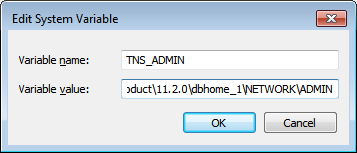
Solution : Go to environmental variables and create a new variable Name as “TNS_ADMIN” and set the value as  Oracle Home\NETWORK\ADMIN.

Thursday, July 28, 2016

Dynamic File Name in Command Spool

Is it possible to change the spool file name dynamically?

Yes its possible to change the name dynamically. but its depending on the requirement.Here is the sample example how we can add the date string to the file name.

once you know how to add the date string to file name then you can apply the same formula to any others.

we have to take one dummy column to print and will take the date in to that dummy column. see the example below

SQL> column filename new_val filename
SQL> select sysdate filename from dual;

FILENAME
---------
28-JUL-16

SQL> spool &filename
SQL> select sysdate from dual;

SYSDATE
---------
28-JUL-16

SQL> spool off;
SQL>
once its done ,you can check the file in the same folder from where you have login to oracle.
or you can specify the path to generate the file.

for this case all the files will generate with the extinction is ".LST". example : "28-JUL-16.LST"


Monday, July 25, 2016

Oracle listener errors : Troubleshooting Oracle Net Services :ORA-12541 TNS :no listener:ORA-01034: ORA-27101

Oracle listener errors :

you may get following type of error for listener :

C:\Users\Administrator>lsnrctl status
Connecting to (DESCRIPTION=(ADDRESS=(PROTOCOL=TCP)(HOST=WIN-JSJDDUESQH9)(PORT=1521)))
TNS-12541: TNS:no listener
TNS-12560: TNS:protocol adapter error
TNS-00511: No listener
64-bit Windows Error: 61: Unknown error

When you get the error "TNS no listener errors", that the Windows listener service is not accepting connections or the service is not running.As recommended need to re-start the listener by using the command "lsnrctl start" or lsnrctl reload  
 Once the listener started using "LNSRCTL START or LSNRCTL RELOAD" listener will start and you can observe the status of current listener by run the following command "LSNRCTL STATUS"
Most of the cases once the listener will start then your are able to connect the oracle and issue got resolved.Even though listener was running some time you may get another type of errors like "ORA-01034: ORA-27101:  "as following :
C:\Users\Administrator>sqlplus

SQL*Plus: Release 11.2.0.1.0 Production on Mon Jul 25 17:44:31 2016

Copyright (c) 1982, 2010, Oracle.  All rights reserved.

Enter user-name: system
Enter password:
ERROR:
ORA-01034: ORACLE not available
ORA-27101: shared memory realm does not exist
Process ID: 0
Session ID: 0 Serial number: 0
For these kind of errors even listener was running, we have to run the following commands to resolve the issue. We have to connect the oracle by using /nolog first and then run the below commands.
set oracle_sid=orcl
sqlplus /nolog
conn sys/sys as sysdba
shutdown abort
startup
check the below image :
now the oracle has started successfully and you are able to see the ORCL instance in listener status also.