Thursday, May 27, 2021

ORA-00600: internal error code, arguments:

ORA-00600: internal error code, arguments:


Error : 


Microsoft Windows [Version 6.1.7601]

Copyright (c) 2009 Microsoft Corporation.  All rights reserved.

C:\Users\Administrator>set ORACLE_SID=orcl

C:\Users\Administrator>sqlplus / as sysdba

SQL*Plus: Release 11.2.0.2.0 Production on Thu May 27 13:53:31 2021

Copyright (c) 1982, 2010, Oracle.  All rights reserved.

ERROR:

ORA-01031: insufficient privileges

Enter user-name: sys as sysdba

Enter password:

Connected to:

Oracle Database 11g Enterprise Edition Release 11.2.0.1.0 - Production

With the Partitioning, OLAP, Data Mining and Real Application Testing options


SQL> select name,open_mode from v$database;

NAME      OPEN_MODE
--------- --------------------
ORCL      MOUNTED

SQL> alter database open;

alter database open

*

ERROR at line 1:

ORA-00600: internal error code, arguments: [kcratr_nab_less_than_odr], [1],

[13732], [10364], [10373], [], [], [], [], [], [], []


Solution:: 

1. Start the database in mount state. and check the following.


SQL> startup mount
ORACLE instance started.
Total System Global Area 1071333376 bytes
Fixed Size                  1375792 bytes
Variable Size             738197968 bytes
Database Buffers          318767104 bytes
Redo Buffers               12992512 bytes
Database mounted.


After database mounted check the control file locations.

SQL> Show parameter control_files


NAME                                 TYPE        VALUE

------------------------------------ ----------- ------------------------------

control_files                        string      C:\APP\ADMINISTRATOR\ORADATA\O

                                                 RCL\CONTROL01.CTL, C:\APP\ADMI

                                                 NISTRATOR\FLASH_RECOVERY_AREA\

                                                 ORCL\CONTROL02.CTL


2. Keep the backup of the existing control files into different location.

copy the control files into different locations.


3.  Run the below command in the prompt check for the existing archive/Redo logs 

SQL> select a.member, a.group#, b.status from v$logfile a ,v$log b where a.group

#=b.group# and b.status='CURRENT';


MEMBER
--------------------------------------------------------------------------------
    GROUP# STATUS
---------- ----------------
C:\APP\ADMINISTRATOR\ORADATA\ORCL\REDO01.LOG
         1 CURRENT


4.  Then run the following commands

SQL> shut abort
ORACLE instance shut down.

SQL> startup mount
ORACLE instance started.
Total System Global Area 1071333376 bytes
Fixed Size                  1375792 bytes
Variable Size             738197968 bytes
Database Buffers          318767104 bytes
Redo Buffers               12992512 bytes
Database mounted.

5.   If you find any archive logs then need to recover the database using that file.

After execute the recovery statement you need to provide the existing redo file path.

SQL> recover database using backup controlfile until cancel ;
ORA-00279: change 10779076540828 generated at 05/27/2021 09:38:44 needed for
thread 1
ORA-00289: suggestion :
C:\APP\ADMINISTRATOR\FLASH_RECOVERY_AREA\ORCL\ARCHIVELOG\2021_05_27\O1_MF_1_1373
2_%U_.ARC
ORA-00280: change 10779076540828 for thread 1 is in sequence #13732

Specify log: {<RET>=suggested | filename | AUTO | CANCEL}
C:\APP\ADMINISTRATOR\ORADATA\ORCL\REDO01.LOG
Log applied.
Media recovery complete.

6. If you see the "Media recovery Complete. then you the statement of resetlogs.
 
SQL> Alter database open resetlogs ;
Database altered.

7.  Finally you can check the database open_mode .

SQL> select name,open_mode from v$database;
NAME      OPEN_MODE
--------- --------------------
ORCL      READ WRITE

SQL> 


Monday, February 10, 2020

Oracle Universal Installer not launching Windows

oracle universal installer not launching windows when I run installer in windows 2016, windows 10 getting following error.

checking monitor: must be configured to display at least 256 colors. actual 4294967296 passed

the number of files bootstrapped for the jre is 0.

the number of files bootstrapped for the oui is 0.


In the case of Oracle 11g, if the installation drive (c:\) has more than 2TB of free space, it may fail to install.

I am trying to install Oracle in the computer was 5TB. (in windows 2016 64bit)

When I was try to shrink the drive to less than 2TB then was able to install ORACLE 11G in that system.

So make sure before installing the Oracle in windows or when you get the error while installing.

please make sure the diskspace of the C:\ drive or installation disk.


hope this will help.


Thursday, November 14, 2019

ORA-00204:ORA-00202:ORA-27070:OSD-04006:O/S-Error:/Database not able to startup showing an error in reading control file

Database not able to startup showing an error in reading control file with following error
ORA-00204:ORA-00202:ORA-27070:OSD-04006:

ORA-00204: error in reading (block 3, # blocks 8) of control file                     
ORA-00202: control file: 'E:\oracle\ORADATA\LOCAL\CONTROL01.CTL'                       
ORA-27070: async read/write failed                                                     
OSD-04006: ReadFile() failure, unable to read from file                               
O/S-Error: (OS 1117) The request could not be performed because of an I/O device error.


When I startup the database getting the following error:


SQL> startup
ORACLE instance started.

Total System Global Area 3206836224 bytes
Fixed Size                  2180024 bytes
Variable Size            1996491848 bytes
Database Buffers         1191182336 bytes
Redo Buffers               16982016 bytes
ORA-00204: error in reading (block 3, # blocks 10) of control file
ORA-00202: control file: 'E:\oracle\ORADATA\LOCAL\CONTROL01.CTL'
ORA-27070: async read/write failed
OSD-04006: ReadFile() failure, unable to read from file
O/S-Error: (OS 1117) The request could not be performed because of an I/O device error.

try to shutdown the database and do the following steps:

Shutdown immediate;
Startup or startup nomount;

If you get this kind of error while starting the database or try to mount the database then need to check the control file. are you able to access the control file path.?

to check the control file location stater the database with no mount state and use the below command

show parameter contrl

you may see the following path which have the control file locations.

SQL> show parameter control

NAME                                 TYPE        VALUE
------------------------------------ ----------- ------------------------------
control_file_record_keep_time        integer     7
control_files                        string      E:\ORACLE\ORADATA\LOCAL\CONTRO
                                                 L01.CTL, C:\APP\ADMINISTRATOR\
                                                 FLASH_RECOVERY_AREA\LOCAL\CONT
                                                 ROL02.CTL
control_management_pack_access       string      DIAGNOSTIC+TUNING
SQL>


Conclusion :
The above error says control file may be corrupt.
So you need to start the database using contril2.ctl or you can copy the cocntrol2.ctl and rename to control1.ctl

and try to startup the database.


Monday, September 23, 2019

ORA-00119 :ORA-00132 invalid specification for system parameter LOCAL_LISTENER

ORA-00119 : invalid specification for system parameter LOCAL_LISTENER


When I try to start the database getting the following error :

SQL> STARTUP
ORA-00119: invalid specification for system parameter LOCAL_LISTENER
ORA-00132: syntax error or unresolved network name ‘LISTENER_LOCAL’

Solution :

Open tnsnames.ora file and check for "LISTENER_LOCAL" listener description.

Usually you will find the tns entry like as follow :


ORCL =
  (DESCRIPTION =
    (ADDRESS_LIST =
      (ADDRESS = (PROTOCOL = TCP)(HOST = localhost)(PORT = 1521))
    )
    (CONNECT_DATA =
      (SERVICE_NAME = test)
    )
  )


In the TNS list if you didn't find the alias name like 'LISTENER_LOCAL'

Please add one more entry with the string with database you try to point:


LISTENER_LOCAL =
  (DESCRIPTION =
    (ADDRESS_LIST =
      (ADDRESS = (PROTOCOL = TCP)(HOST =)(PORT = 1521))
    )
    (CONNECT_DATA =
      (SERVICE_NAME = )
    )
  )


Save the file and try to start the database.

SQL>STARTUP
ORACLE instance started.


Total System Global Area 1912602624 bytes
Fixed Size                  2005192 bytes
Variable Size             369100600 bytes
Database Buffers         1526726656 bytes
Redo Buffers               14770176 bytes
Database mounted.
Database opened.

Tuesday, June 11, 2019

Change noarchivelog mode to archivelog mode in RAC


To check database is in archive log mode or not :

Run the command archive log list;

[oracle@node4 ~]$ sqlplus / as sysdba

SQL*Plus: Release 11.2.0.4.0 Production on Mon Jun 10 12:29:02 2019

Copyright (c) 1982, 2013, Oracle.  All rights reserved.


Connected to:
Oracle Database 11g Enterprise Edition Release 11.2.0.4.0 - 64bit Production
With the Partitioning, Real Application Clusters, Automatic Storage Management, OLAP,
Data Mining and Real Application Testing options

SQL>
SQL> archive log list
Database log mode        No Archive Mode
Automatic archival        Disabled
Archive destination        /u01/app/oracle/product/11.2.0.3/dbhome_1/dbs/arch
Oldest online log sequence     2
Current log sequence        3
SQL>
SQL> exit
Disconnected from Oracle Database 11g Enterprise Edition Release 11.2.0.4.0 - 64bit Production
With the Partitioning, Real Application Clusters, Automatic Storage Management, OLAP,
Data Mining and Real Application Testing options

Based on above result database is in  "no archive mode".
This means database is not in archive log mode.

To enable the database in archive log mode in RAC  run the below commands.

1. Stop the database using SRVCTL.
2. Start database in mount state.
3. Run the command to enable the archive mode "alter database archivelog;"
4. Stop the database using SRVCTL.
5. Start database using SRVCTL.
6. Set the archive destination to ASM DISK by running the command
alter system set log_archive_dest_1='LOCATION=+FRADG/' scope=both sid='*';

After that connect to Sql and run  archive log list


Stop the database using SRVCTL :

[oracle@node4 ~]$ srvctl stop database -d racdb
[oracle@node4 ~]$

Start databse in mount state :

[oracle@node4 ~]$ srvctl start database -d racdb -o mount
[oracle@node4 ~]$
[oracle@node4 ~]$ sqlplus / as sysdba

SQL*Plus: Release 11.2.0.4.0 Production on Mon Jun 10 12:29:02 2019

Copyright (c) 1982, 2013, Oracle.  All rights reserved.


Connected to:
Oracle Database 11g Enterprise Edition Release 11.2.0.4.0 - 64bit Production
With the Partitioning, Real Application Clusters, Automatic Storage Management, OLAP,
Data Mining and Real Application Testing options

SQL> select instance_name,status,archiver from gv$instance;

INSTANCE_NAME STATUS       ARCHIVE
---------------- ------------ -------
racdb1 MOUNTED      STOPPED
racdb2 MOUNTED      STOPPED

SQL>

Run the command to enable the archive mode :

SQL> alter database archivelog;

Database altered.

SQL> exit
Disconnected from Oracle Database 11g Enterprise Edition Release 11.2.0.4.0 - 64bit Production
With the Partitioning, Real Application Clusters, Automatic Storage Management, OLAP,
Data Mining and Real Application Testing options
[oracle@node4 ~]$

Stop the database using SRVCTL :

[oracle@node4 ~]$ srvctl stop database -d racdb
[oracle@node4 ~]$

Start the database using SRVCTL

[oracle@node4 ~]$ srvctl start database -d racdb
[oracle@node4 ~]$

Set the archive destination to ASM DISK by running the command  :

[oracle@node4 ~]$ sqlplus / as sysdba

SQL*Plus: Release 11.2.0.4.0 Production on Mon Jun 10 12:32:40 2019

Copyright (c) 1982, 2013, Oracle.  All rights reserved.


Connected to:
Oracle Database 11g Enterprise Edition Release 11.2.0.4.0 - 64bit Production
With the Partitioning, Real Application Clusters, Automatic Storage Management, OLAP,
Data Mining and Real Application Testing options

SQL> alter system set log_archive_dest_1='LOCATION=+FRADG/' scope=both sid='*';

System altered.

SQL> select instance_name,status,archiver from gv$instance;

INSTANCE_NAME STATUS       ARCHIVE
---------------- ------------ -------
racdb1 OPEN       STARTED
racdb2 OPEN       STARTED

SQL>

Check archive log mode now :
SQL> archive log list
Database log mode        Archive Mode
Automatic archival        Enabled
Archive destination        +FRADG
Oldest online log sequence     2
Next log sequence to archive   3
Current log sequence        3
SQL>

To check log switch run the command

SQL> alter system switch logfile;

System altered.

SQL> /

System altered.

SQL> archive log list
Database log mode        Archive Mode
Automatic archival        Enabled
Archive destination        +FRADG
Oldest online log sequence     4
Next log sequence to archive   5
Current log sequence        5
SQL> 

ADD DISKS TO ASM DISKGROUP

How do I add a disks to ASM DISKGROUP ?

1. Create partition of disk /dev/sde which we got new LUN from Storage.

you can check the disks as fdisk -l

for formatting the disks :::

[root@node4 Ora-Soft]# fdisk /dev/sdc
Device contains neither a valid DOS partition table, nor Sun, SGI or OSF disklabel
Building a new DOS disklabel with disk identifier 0x494214d4.
Changes will remain in memory only, until you decide to write them.
After that, of course, the previous content won't be recoverable.

Warning: invalid flag 0x0000 of partition table 4 will be corrected by w(rite)

WARNING: DOS-compatible mode is deprecated. It's strongly recommended to
         switch off the mode (command 'c') and change display units to
         sectors (command 'u').

Command (m for help): n
Command action
   e   extended
   p   primary partition (1-4)
p
Partition number (1-4): 1
First cylinder (1-261, default 1):  >> enter
Using default value 1
Last cylinder, +cylinders or +size{K,M,G} (1-261, default 261):  >> enter
Using default value 261

Command (m for help): w
The partition table has been altered!

Calling ioctl() to re-read partition table.
Syncing disks.

2.  Create ASM disk using oracleasm utility

[root@node4 Ora-Soft]# /etc/init.d/oracleasm createdisk ASMDISK2 /dev/sdc1
Marking disk "ASMDISK2" as an ASM disk:                    [  OK  ]

3  check Scadisks and Listdisks using oracleasm utility 

[root@node4 ~]# /etc/init.d/oracleasm scandisks
Scanning the system for Oracle ASMLib disks:               [  OK  ]
[root@node4 ~]# /etc/init.d/oracleasm listdisks
ASMDISK1
ASMDISK2
ASMDISK3
[root@node4 ~]#


4. Now Add the newly created oracle ASM disk to existing ASM diskgroup with the help of following query:

Login to grid user and loin as sysasm and run the following Query.

[grid@node4 ~]$ sqlplus / as sysasm

SQL*Plus: Release 11.2.0.4.0 Production on Mon Jun 10 17:12:36 2019

Copyright (c) 1982, 2013, Oracle.  All rights reserved.


Connected to:
Oracle Database 11g Enterprise Edition Release 11.2.0.4.0 - 64bit Production
With the Real Application Clusters and Automatic Storage Management options

SQL> select * from v$asm_operation;

no rows selected

SQL> ALTER DISKGROUP DATADG ADD DISK 'ORCL:ASMDISK2' REBALANCE POWER 11;

Diskgroup altered.

SQL> set lines 300
SQL> select * from v$asm_operation;

GROUP_NUMBER OPERA STAT      POWER     ACTUAL    SOFAR   EST_WORK   EST_RATE EST_MINUTES ERROR_CODE
------------ ----- ---- ---------- ---------- ---------- ---------- ---------- ----------- ------------
   1 REBAL RUN 11    11      288       1012   1366 0

Check Diskgroup size: 

SQL> SELECT NAME,TOTAL_MB/1024 as TOTAL_GB,FREE_MB /1024 as FREE_GB,(TOTAL_MB-FREE_MB)/1024 as USED_GB FROM v$asm_diskgroup; 

NAME TOTAL_GB    FREE_GB USED_GB
------------------------------ ---------- ---------- ----------
DATADG        3.99804688 2.01464844 1.98339844
FRADG        1.99902344 1.81347656 .185546875
VOTEDISK        1.99902344 1.61230469  .38671875

ORA-15032: not all alterations performed ORA-15260: permission denied on ASM disk group

When you add disks to ASM if you will get the following error :

SQL> ALTER DISKGROUP DATADG ADD DISK 'ORCL:DATADG2' REBALANCE POWER 11;
ALTER DISKGROUP DATADG ADD DISK 'ORCL:DATADG2' REBALANCE POWER 11
*
ERROR at line 1:
ORA-15032: not all alterations performed
ORA-15260: permission denied on ASM disk group

Solution : 
Connect as sysasm and try to run the commands.

[grid@node4 ~]$ sqlplus / as sysasm

SQL*Plus: Release 11.2.0.4.0 Production on Mon Jun 10 17:12:36 2019

Copyright (c) 1982, 2013, Oracle.  All rights reserved.


Connected to:
Oracle Database 11g Enterprise Edition Release 11.2.0.4.0 - 64bit Production
With the Real Application Clusters and Automatic Storage Management options

SQL> select * from v$asm_operation;                                    

no rows selected

SQL> ALTER DISKGROUP DATADG ADD DISK 'ORCL:DATADG2' REBALANCE POWER 11;

Diskgroup altered.

Monday, January 14, 2019

Check maximum number of processes & processes used by schema

To check maximum number of processes & processes used  by schema :

select resource_name, current_utilization, max_utilization from v$resource_limit where resource_name in ('processes','sessions');

-- processes/sessions are getting is by running max utilization is the high level ::

SELECT inst_id,resource_name, current_utilization, max_utilization, limit_value FROM gv$resource_limit
WHERE resource_name in ('processes','sessions');


--See which machines/schemas are causing any process exhaustion ::

--number of processes using by schema or machine


select distinct
        s.inst_id,
        s.username,
        s.machine,
        count(*)
from    gv$session s,
        gv$process p
where   s.paddr       =  p.addr
and     s.inst_id     =  p.inst_id
GROUP BY         s.inst_id,
        s.username,
        s.machine
ORDER BY 4 desc;

Thursday, December 27, 2018

ORA-00205: error in identifying control file, check alert log for more info

ORA-00205: error in identifying control file, check alert log for more info.


When startup the databse getting error like ORA-00205

[oracle@db_ ~]$ sqlplus / as sysdba

SQL*Plus: Release 11.2.0.1.0 Production on Thu Dec 27 21:18:15 2018

Copyright (c) 1982, 2009, Oracle.  All rights reserved.

Connected to an idle instance.

SYS@adjstage>startup
ORACLE instance started.

Total System Global Area 1068937216 bytes
Fixed Size     2220200 bytes
Variable Size   855641944 bytes
Database Buffers   201326592 bytes
Redo Buffers     9748480 bytes
ORA-00205: error in identifying control file, check alert log for more info

Solution :- 

Check the control file location.

SYS@adjstage>show parameter control_files

NAME      TYPE VALUE
------------------------------------ ----------- ------------------------------
control_files      string /u01/datafile/adjstage_datafil
es/ADJSTAGE/controlfile/o1_mf_
7knp4dys_.ctl

Ensure control file exists in the respective locations.

Also check the permission for the file.

[root@db_ controlfile]# ll u01/datafile/adjstage_datafiles/ADJSTAGE/controlfile/o1_mf_7knp4dys_.ctl

-rw-r----- 1 oracle oinstall 14237696 Dec 27 22:38 o1_mf_7knp4dys_.ctl
[root@db_ controlfile]# 

permission should be oracle:oinstall.
After checking the permission shutdown and startup the database.

Shutdown the database and start it up:

SYS@adjstage> shut immediate;
ORA-01507: database not mounted
ORACLE instance shut down.

SYS@adjstage>startup
ORACLE instance started.

Total System Global Area 1068937216 bytes
Fixed Size     2220200 bytes
Variable Size   855641944 bytes
Database Buffers   201326592 bytes
Redo Buffers     9748480 bytes
Database mounted.
Database opened.


SYS@adjstage>select name,open_mode from v$database;  

NAME   OPEN_MODE
--------- --------------------
ADJSTAGE  READ WRITE


Monday, October 15, 2018

ORA-00119: invalid specification for system parameter LOCAL_LISTENER /ORA-00132: syntax error or unresolved network name 'LISTENER_'

ORA-00119: invalid specification for system parameter LOCAL_LISTENER  /ORA-00132: syntax error or unresolved network name 'LISTENER_':


Some time when you try to startup the database you will get the following errors.

ORA-00119: invalid specification for system parameter LOCAL_LISTENER
ORA-00132: syntax error or unresolved network name 'LISTENER_ORCL'

It is just because of Listener not running or missing listener which was shown in the error.

To solve this you need to add entry in listener.ora  file.

in my case I have did the following steps. It might help you to resolve the issue in you case.. please check the following steps which I was followed.

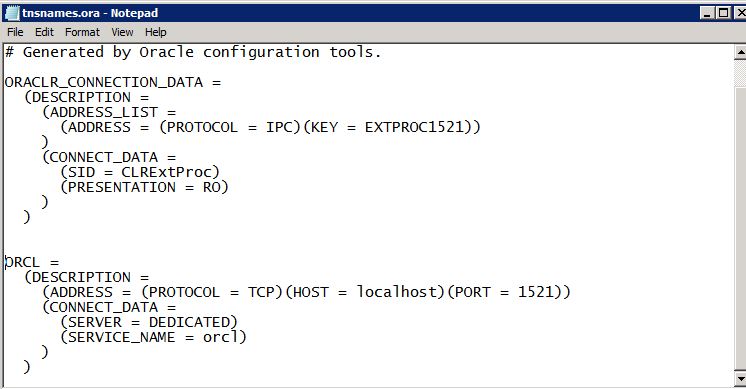
when I try to start the database I got this error.


I was added entry in Listener.ora as well tnsnames.ora fiels.


This was before adding the exact name in tnsnames.ora file

After adding exact listener name in the file 


And then I was try to do tnsping to the listener which was added. If the tnsping was success then it was communicating.. 


Now you can see the database is up with the proper listener which was added.


How to Check Oracle Database Tablespace for individual tablespace.

Check Individual tablespace allocated Quota, Free and used  details.


You can run the below query with DBA privileges.

Below query will give you the result in GB's


SELECT df.tablespace_name "Tablespace",
  totalusedspace "Used GB",
  (df.totalspace - tu.totalusedspace) "Free GB",
  df.totalspace "Total GB",
  ROUND(100 * ( (df.totalspace - tu.totalusedspace)/ df.totalspace)) "% Free"
FROM
  (SELECT tablespace_name,
    ROUND(SUM(bytes) / (1024*1024*1024)) TotalSpace
  FROM dba_data_files
  GROUP BY tablespace_name
  ) df,
  (SELECT ROUND(SUM(bytes)/(1024*1024*1024)) totalusedspace,
    tablespace_name
  FROM dba_segments
  GROUP BY tablespace_name
  ) tu
WHERE df.tablespace_name = tu.tablespace_name
and df.tablespace_name='USERS'


You will get the Tablespace size in MB's by running the following :

SELECT df.tablespace_name "Tablespace",
  totalusedspace "Used GB",
  (df.totalspace - tu.totalusedspace) "Free GB",
  df.totalspace "Total GB",
  ROUND(100 * ( (df.totalspace - tu.totalusedspace)/ df.totalspace)) "% Free"
FROM
  (SELECT tablespace_name,
    ROUND(SUM(bytes) / (1024*1024)) TotalSpace
  FROM dba_data_files
  GROUP BY tablespace_name
  ) df,
  (SELECT ROUND(SUM(bytes)/(1024*1024)) totalusedspace,
    tablespace_name
  FROM dba_segments
  GROUP BY tablespace_name
  ) tu
WHERE df.tablespace_name = tu.tablespace_name
and df.tablespace_name='USERS'

Thursday, October 4, 2018

Original date created for an Oracle table

Created date from the Oracle table :

To know the original created date of a particular table there is a view called "dba_objects".

here is the view description

SYSTEM@orcl:SQL>desc dba_objects
 Name                                      Null?    Type
 ----------------------------------------- -------- ----------------------------
 OWNER                                              VARCHAR2(30)
 OBJECT_NAME                                        VARCHAR2(128)
 SUBOBJECT_NAME                                     VARCHAR2(30)
 OBJECT_ID                                          NUMBER
 DATA_OBJECT_ID                                     NUMBER
 OBJECT_TYPE                                        VARCHAR2(19)
 CREATED                                            DATE
 LAST_DDL_TIME                                      DATE
 TIMESTAMP                                          VARCHAR2(19)
 STATUS                                             VARCHAR2(7)
 TEMPORARY                                          VARCHAR2(1)
 GENERATED                                          VARCHAR2(1)
 SECONDARY                                          VARCHAR2(1)
 NAMESPACE                                          NUMBER
 EDITION_NAME                                       VARCHAR2(30)

In this view there  is a column named "created " exists in the data dictionary dba_objects view.

using this created we can get the details when was table created.

you can use the following query to get the date.

SELECT CREATED FROM DBA_OBJECTS
WHERE  OBJECT_TYPE = 'TABLE'
AND OBJECT_NAME = 'USERDETAILS';

sample out put will be :

CREATED
---------
13-FEB-18

Thursday, April 12, 2018

Latest 10 rows from oracle.


we can get the recent or latest 10 rows from oracle database based on the sysdate i.e current date.

below query will give you the today's recent 10 transactions.

SELECT *
   FROM (SELECT ID,CREATED FROM EMP
            WHERE TRUNC(CREATED)>=TRUNC(SYSDATE) ORDER BY CREATED DESC )
WHERE ROWNUM <= 10

Monday, November 6, 2017

ORA-01589: must use RESETLOGS or NORESETLOGS option for database open


Error::

SQL> startup
ORACLE instance started.

Total System Global Area  778387456 bytes
Fixed Size                  1374808 bytes
Variable Size             494929320 bytes
Database Buffers          276824064 bytes
Redo Buffers                5259264 bytes
Database mounted.
ORA-01589: must use RESETLOGS or NORESETLOGS option for database open

Cause: Either incomplete or backup control file recovery has been performed. when you see these types of recovery you must specify either the RESETLOGS option or the NORESETLOGS option in-order to open your database.


Solution ::

* When you run the startup command you will get the following error.

SQL> startup
ORACLE instance started.

Total System Global Area  778387456 bytes
Fixed Size                  1374808 bytes
Variable Size             494929320 bytes
Database Buffers          276824064 bytes
Redo Buffers                5259264 bytes
Database mounted.
ORA-01589: must use RESETLOGS or NORESETLOGS option for database open

SQL> alter database open noresetlogs;
alter database open noresetlogs
*
ERROR at line 1:
ORA-01588: must use RESETLOGS option for database open

* Use the following command to recovery the database.

C:\Users\She>rman target /

Recovery Manager: Release 11.2.0.1.0 - Production on Thu Sep 14 20:04:01 2017

Copyright (c) 1982, 2009, Oracle and/or its affiliates.  All rights reserved.

connected to target database: ORCL (DBID=1398505858, not open)

RMAN>   recover database;

Starting recover at 14-SEP-17
using target database control file instead of recovery catalog
allocated channel: ORA_DISK_1
channel ORA_DISK_1: SID=156 device type=DISK

starting media recovery

archived log for thread 1 with sequence 357 is already on disk as file D:\APP\SH
ESHA\ORADATA\ORCL\REDO03.LOG
archived log for thread 1 with sequence 358 is already on disk as file D:\APP\SH
ESHA\ORADATA\ORCL\REDO01.LOG
archived log file name=D:\APP\She\ORADATA\ORCL\REDO03.LOG thread=1 sequence=3
57
media recovery complete, elapsed time: 00:00:14
Finished recover at 14-SEP-17

RMAN> exit


Recovery Manager complete.

* Once the recovery manager complete then do the following process.

C:\Users\She>sqlplus / as sysdba

SQL*Plus: Release 11.2.0.1.0 Production on Thu Sep 14 20:05:03 2017

Copyright (c) 1982, 2010, Oracle.  All rights reserved.


Connected to:
Oracle Database 11g Enterprise Edition Release 11.2.0.1.0 - Production
With the Partitioning, OLAP, Data Mining and Real Application Testing options

SQL> shut immediate
ORA-01109: database not open


Database dismounted.
ORACLE instance shut down.
SQL> startup mount
ORACLE instance started.

Total System Global Area  778387456 bytes
Fixed Size                  1374808 bytes
Variable Size             494929320 bytes
Database Buffers          276824064 bytes
Redo Buffers                5259264 bytes
Database mounted.

SQL> ALTER DATABASE OPEN RESETLOGS;

Database altered.

SQL> exit
Disconnected from Oracle Database 11g Enterprise Edition Release 11.2.0.1.0 - Pr
oduction
With the Partitioning, OLAP, Data Mining and Real Application Testing options

C:\Users\She>sqlplus hr/hr

SQL*Plus: Release 11.2.0.1.0 Production on Thu Sep 14 20:07:02 2017

Copyright (c) 1982, 2010, Oracle.  All rights reserved.


Connected to:
Oracle Database 11g Enterprise Edition Release 11.2.0.1.0 - Production
With the Partitioning, OLAP, Data Mining and Real Application Testing options

SQL>


** In the above we have used the below commands after successfully recovery.

shut immediate;
startup mount:
alter databse open resetlogs;

Wednesday, June 21, 2017

HOW TO CHANGE NO ARCHIVE LOG MODE TO ARCHIVE LOG IN RAC ENVIRONMENT

HOW TO CHANGE  NO ARCHIVE LOG MODE TO ARCHIVE LOG IN RAC

Enable Archivelog ::

1) verify the archive log mode in any one of the node

To check the archive log list you need to run the commnd " Archive log list"

SQL> archive log list
Database log mode              No Archive Mode
Automatic archival             Disabled
Archive destination            USE_DB_RECOVERY_FILE_DEST
Oldest online log sequence     86
Current log sequence           88

SQL> select name, log_mode from v$database;

NAME LOG_MODE
--------- ------------
ocrac NOARCHIVELOG

2) You need to disable the cluster instance parameter by setting cluster_database to FALSE from the current instance.
Pleae follow the below steps.

sqlplus "/ as sysdba"
SQL> alter system set cluster_database=false scope=spfile sid='ocrac';

3) Now you have to shutdown all instances accessing the clustered database

  srvctl stop database -d ocrac

4) Using the local instance, MOUNT the database:

sqlplus "/ as sysdba"
SQL> startup mount

5) Enable archiving

SQL> alter database archivelog;

Now you have successfully enable the archivelog mode.

6) You have to re-enable the instance parameter cluster_database to TRUE from the current instance by using the following command.

SQL> alter system set cluster_database=true scope=spfile sid='ocrac';

7) You have to bounce the local instance.

SQL> shutdown immediate

8) Bring all instance back up using srvctl.

srvctl start database -d ocrac

9) Login to the local instance and verify Archive Log Mode is enabled

sqlplus "/ as sysdba"
SQL> archive log list
Database log mode            Archive Mode
Automatic archival             Enabled
Archive destination           /u01/app/oracle/product/11.2.0/dbhome_1/dbs/arch
Oldest online log sequence     86
Next log sequence to archive  88
Current log sequence               89

10) After enabling Archive Log Mode, each instance in the RAC configuration can automatically archive redologs.

Disable Archivelog ::

1) set oracle_sid=ocrac
SQL> alter system set cluster_database=false scope=spfile sid='ocrac';
System altered.

2) /u01/app/grid/bin> srvctl stop database -d ocrac -o immediate

3) SQL> startup mount
Total System Global Area 2471931904 bytes
Fixed Size            2255752 bytes
Variable Size          671089784 bytes
Database Buffers     1778384896 bytes
Redo Buffers           20201472 bytes
Database mounted.

SQL> archive log list
Database log mode Archive Mode
Automatic archival Enabled
Archive destination USE_DB_RECOVERY_FILE_DEST
Oldest online log sequence 8
Next log sequence to archive 9
Current log sequence 9

SQL> alter database noarchivelog;
Database altered.
SQL> alter system set cluster_database=true scope=spfile sid='ocrac';
System altered.

SQL> shutdown immediate
ORA-01109: database not open
Database dismounted.
ORACLE instance shut down.

4) /u01/app/grid/bin>>srvctl start database -d ocrac

5) export ORACLE_SID=ocrac

oracle@ocluster01:~| /home/oracle >sqlplus / as sysdba

SQL*Plus: Release 11.2.0.4.0 Production on Wed Jun 21 19:55:19 2017

Copyright (c) 1982, 2013, Oracle.  All rights reserved.


Connected to:
Oracle Database 11g Enterprise Edition Release 11.2.0.4.0 - 64bit Production
With the Partitioning, Real Application Clusters, Automatic Storage Management, OLAP,
Data Mining and Real Application Testing options

SQL>

SQL> archive log list
Database log mode No Archive Mode
Automatic archival Disabled
Archive destination USE_DB_RECOVERY_FILE_DEST
Oldest online log sequence 18
Current log sequence 19
SQL>
 

DDL, DML, DCL and TCL Statements in SQL with Examples

DDL, DML, DCL and TCL Statements in SQL

SQL language is divided into four types of primary language statements.
They are DML, DDL, DCL and TCL.

1. DML (Data Manipulation Language)
2. DDL (Data Definition Language)
3. DCL (Data Control Language)
4. TCL (Transaction Control Language)

Using these statements, we can define the structure of a database by creating and altering database objects.
These are basic operations we perform on data such as selecting a few records from a table, inserting new records, deleting unnecessary records, and updating/modifying existing records.
We also can control which user can read/write data or manage transactions to create a single unit of work.

DML statements include the following:

SELECT – select records from a table
INSERT – insert new records
UPDATE – update/Modify existing records
DELETE – delete existing records

DDL (Data Definition Language)

DDL statements are used to alter/modify a database or table structure and schema.

statements are used to define the database structure or schema.

CREATE – create a new Table, database, schema
ALTER – alter existing table, column description
DROP – delete existing objects from database
TRUNCATE - remove all records from a table, including all spaces allocated for the records are removed
COMMENT - add comments to the data dictionary
RENAME - rename an object

DCL (Data Control Language)

DCL statements control the level of access that users have on database objects.

GRANT – allows users to read/write on certain database objects
REVOKE – keeps users from read/write permission on database objects
TCL (Transaction Control Language)

TCL statements allow you to control and manage transactions to maintain the integrity of data within SQL statements.

BEGIN Transaction – opens a transaction
COMMIT Transaction – commits a transaction
ROLLBACK Transaction – ROLLBACK a transaction in case of any error

Friday, May 26, 2017

Reverse A given number using PL/SQL Procedure


Using PL/SQL its very simple and easy to reverse a given number.


CREATE OR REPLACE PROCEDURE REVERSE_NUM(NUM NUMBER)IS
RNO NUMBER;
BEGIN
DBMS_OUTPUT.PUT_LINE('GIVEN NUMBER IS :' || NUM);
FOR I IN REVERSE 1..LENGTH(NUM)
LOOP
RNO := RNO || SUBSTR(NUM,I,1);
END LOOP;
DBMS_OUTPUT.PUT_LINE('REVERSE NUMBER IS : ' || RNO);
END;
/

To Execute this procedure use the below command:

EXECUTE REVERSE_NUM(1234);

Tuesday, April 11, 2017

Differences Between Procedures & Functions

Differences Between Procedures & Function


Stored Procedures are pre- compiled objects which are compiled for first time and its compiled format is saved which executes (compiled code) whenever it is called. But Function is compiled and executed every time when it is called.

  • Function must return a value but in Stored Procedure it is optional( Procedure can return zero or n values).
  • Both functions and stored procedures can accept parameters. Functions can accept input parameters but can return only a single return value.     Stored procedures can also accept OUTPUT parameters.
  • Functions can be called from Procedure whereas Procedures cannot be called from Function.
  • Procedure allows SELECT as well as DML(INSERT/UPDATE/DELETE) statement, whereas Function allows only SELECT statement in it.
  • Stored Procedures cannot be used in the SQL statements anywhere in the WHERE/HAVING/SELECT section whereas Function can be.
  • Exception can be handled by try-catch block in a Procedure whereas try-catch block cannot be used in a Function.
  • We can go for Transaction Management in Procedure whereas we can't go in Function.
  • Functions are normally used for computations where as procedures are normally used for executing business logic.
  • Function returns 1 value only. Procedure can return multiple values (max 1024).
  •  Functions cannot alter data or objects in a server. Stored procedures can alter data and objects in database and server.

Summary


Basic Difference. Function must return a value but in Stored Procedure it is optional( Procedure can return zero or n values). Functions can have only input parameters for it whereas Procedures can have input/output parameters . Functions can be called from Procedure whereas Procedures cannot be called from Function


Syntax to create a procedure is ::


CREATE [OR REPLACE] PROCEDURE proc_name [list of parameters]
IS   
   Declaration section
BEGIN   
   Execution section
 

EXCEPTION   
  Exception section
END;

Syntax to create a function is ::


CREATE [OR REPLACE] FUNCTION function_name [parameters]
RETURN return_datatype; 
IS 
Declaration_section 
BEGIN 
Execution_section
Return return_variable; 
 

EXCEPTION 
exception section 
Return return_variable; 
END;

Tuesday, February 21, 2017

EMCA Configuration and Reconfiguration && run EMCA in multiple nodes

Use the below command  to run the emca in multiple nodes :

emca- reconfig-dbcontrol-cluster -EM_NODE ocluster02 -EM_NODE_LIST ocluster02

Here is the detailed explanation..

[oracle@ocluster02 ~]$ emca -reconfig dbcontrol -cluster -EM_NODE ocluster02 -EM_NODE_LIST ocluster02

STARTED EMCA at Feb 15, 2017 11:34:05 AM
EM Configuration Assistant, Version 11.2.0.3.0 Production
Copyright (c) 2003, 2011, Oracle.  All rights reserved.

Enter the following information:
Database unique name: ocracdb
Service name: ocracdb
Do you wish to continue? [yes(Y)/no(N)]: y
Feb 15, 2017 11:34:39 AM oracle.sysman.emcp.EMConfig perform
INFO: This operation is being logged at /u01/app/oracle/cfgtoollogs/emca/ocracdb/emca_2017_02_15_11_34_04.log.
Feb 15, 2017 11:34:42 AM oracle.sysman.emcp.util.DBControlUtil stopOMS
INFO: Stopping Database Control (this may take a while) ...
Feb 15, 2017 11:34:45 AM oracle.sysman.emcp.EMAgentConfig performDbcReconfiguration
INFO: Propagating /u01/app/oracle/product/11.2.0/dbhome_1/ocluster02_ocracdb/sysman/config/emd.properties to remote nodes ...
Feb 15, 2017 11:34:46 AM oracle.sysman.emcp.util.DBControlUtil startOMS
INFO: Starting Database Control (this may take a while) ...
Feb 15, 2017 11:35:19 AM oracle.sysman.emcp.EMDBPostConfig performDbcReconfiguration
INFO: Database Control started successfully
Feb 15, 2017 11:35:19 AM oracle.sysman.emcp.EMDBPostConfig showClusterDBCAgentMessage
INFO:
****************  Current Configuration  ****************
 INSTANCE            NODE           DBCONTROL_UPLOAD_HOST
----------        ----------        ---------------------

ocracdb           ocluster01           ocluster01.bli.com
ocracdb           ocluster02           ocluster02.bli.com


Enterprise Manager configuration completed successfully
FINISHED EMCA at Feb 15, 2017 11:35:19 AM

[oracle@ocluster02 ~]$ emctl status dbconsole
Oracle Enterprise Manager 11g Database Control Release 11.2.0.4.0
Copyright (c) 1996, 2013 Oracle Corporation.  All rights reserved.
https://ocluster02.bli.com:1158/em/console/aboutApplication
Oracle Enterprise Manager 11g is running.
------------------------------------------------------------------
Logs are generated in directory /u01/app/oracle/product/11.2.0/dbhome_1/ocluster02_ocracdb/sysman/log